28 August 2026 · 5 min read
Visual vs text website change detection (use both)
By Kishan Makani · Updated 6 September 2026
A screenshot without the sentence is incomplete. Keep visual and text diffs on the same monitor.
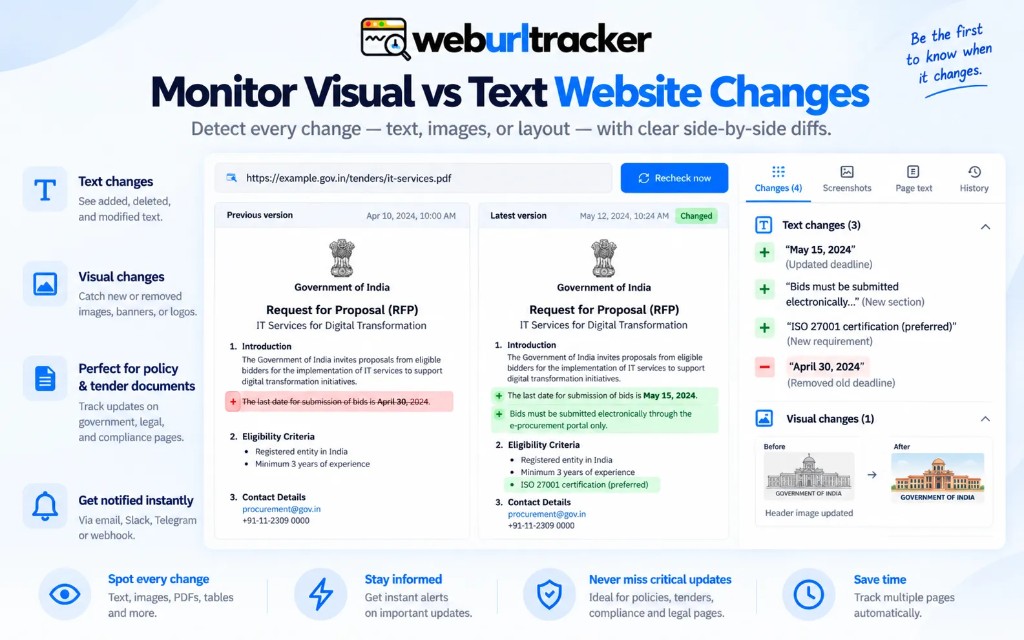
Visual change detection compares pixels. Text change detection compares extracted copy (and sometimes HTML). Teams argue about which one is 'real' monitoring. Both miss things the other catches. The useful product keeps them on one monitor with one region.
The argument usually starts after a bad miss. Legal says 'we would have seen it in the HTML diff.' Marketing says 'the banner clearly changed in the screenshot.' Both are half right. The failure was using only one instrument on a page that moved in two dimensions at once.
This article is about how to combine both without doubling alert volume. If you are new to the category, start with website change monitoring for the baseline workflow.
What visual diffs catch
- A button that vanished while the accessible name stayed in the DOM
- A layout shift that still has the same words
- An image swap, badge, or sold-out overlay
- A broken module that rendered as whitespace
Visual diffs are honest about what a human would see. If the checkout button moved off-screen because of a CSS bug, the pixel diff fires even when the underlying HTML still contains a clickable element. That is valuable for product and growth teams who care about rendered experience, not source code tidiness.
Visual diffs also catch asset swaps: a new hero image, a trust badge added, a strikethrough price styled in red. Text extraction may still read the same numerals if OCR or DOM selection is naive. The picture shows merchandising intent.
What text diffs catch
- A liability clause that moved down the page in the same font
- A price that changed in a way the JPEG compression almost hid
- A new job row that looks like the old row at thumbnail size
- Copy edits on a policy page after a CSS restyle
Text diffs are honest about wording. Counsel can quote the before and after sentence in an email. Sales can paste the old and new price into a battlecard without retyping from a screenshot. Compliance workflows often mandate text evidence for a reason.
Text diffs also survive compression and thumbnail review. A one-cent change on a long price string may not jump out in a JPEG preview. It will show in a string diff. For policy pages, see compliance website monitoring for how legal teams use that evidence.
Failure modes when you pick only one
Screenshot-only workflows miss silent copy edits. The page restyles, the paragraph moves, the font changes, but the hero image stays. Stakeholders say 'looks the same to me' because the picture feels similar. The liability clause gained a sentence.
HTML-only or text-only workflows miss rendered breakage. The DOM still contains the price node. JavaScript failed and the shopper sees blank space. Selector-based tools green-light the check. Revenue teams notice when conversion drops.
Visualping-led workflows train people to trust the picture. Distill.io HTML watches train people to trust the selector. The failure mode is the same: the thing you did not instrument. WebURLTracker stores both against the same region so a legal edit and a banner swap do not share a timeline shape.
One region, two baselines
The practical pattern is one monitor, one rectangle, two comparison channels. Each scheduled check captures pixels and extracted text from that rectangle. Events attach both artifacts. Reviewers do not open two tools or merge two emails.
Region choice still matters. A rectangle that includes a video background will visual-diff constantly. A rectangle that excludes the price will text-diff nothing useful. Tune the box before you tune sensitivity. On pricing pages, monitor competitor pricing pages walks through tight crops.
Thresholds per channel
Thresholds still matter. A 1% visual change on a video background is not an event. A one-word text change in a payment clause is. Set them per monitor. Do not use one global sensitivity for a marketing homepage and a ToS.
Visual threshold is usually a percentage of pixels changed inside the region. Text threshold can be 'any change' for legal copy or 'ignore whitespace' for messy CMS output. Price rules add a third lane: alert when numerals cross a boundary even if visual noise is high.
When visual and text disagree, trust text for wording and visual for layout. A restyle may fire visual alone. A stealth edit may fire text alone. Both firing together is the strongest signal that something material happened.
How tools in the market bias you
Screenshot-first products like Visualping optimize for quick human scan. You will naturally overweight the JPEG. Selector-first products like Distill optimize for DOM stability. You will naturally overweight HTML. Neither bias is fatal if you know it.
If you are evaluating Visualping for screenshot clarity, read Visualping alternative for how WebURLTracker pairs the same region pick with text output. If you are evaluating Distill for selector depth, read Distill.io alternative for workspace plus Local without giving up either diff type.
Practical defaults by page type
- Pricing grid: both channels on, price rule enabled, moderate visual threshold
- Policy / terms: text-weighted, low visual threshold, assignee to legal
- Product detail / inventory: both channels, watch availability badge and price string
- Marketing homepage: higher visual threshold, text diff for headline only if you must watch copy
- Status page: visual often enough if the incident banner is the signal
These are starting points, not laws. Run one monitor for a week, inspect false positives, adjust. The right settings are empirical, not generic.
What good evidence looks like in an event
A strong event answers four questions without opening the live URL: what changed, what it looked like before, what it looks like now, and when. Visual diff supplies the pictures. Text diff supplies quotable strings. Timestamp and monitor name supply context for search later.
That bundle is what makes forwarding to Slack, email, or counsel worthwhile. A lone thumbnail with no extracted copy forces everyone back to the live page, which may have changed again.
Review habits that keep both diffs useful
When triaging an event, scan visual first for layout and merchandising, then text for wording and numbers. Train new reviewers on that order so nobody dismisses a text-only fire because the thumbnail looks similar.
Archive or export events your compliance team cares about. Screenshots alone are harder to search than text. Pairing both gives you a human-readable record and a grep-friendly string.
Local Chrome when the rendered page matters
Some pages render differently in a datacenter browser than in your signed-in Chrome. Geo banners, account tiers, and experiment buckets all affect what pixels and text land in the region. If cloud checks look wrong on day one, try Local on the same region before you widen the rectangle. The diff types stay paired either way.
Extension-based checks still write to the same workspace timeline as cloud checks. Reviewers do not need to know which engine ran. They need consistent before and after artifacts.
WebURLTracker includes visual and text diffs on every monitor in the free tier, alongside 5 monitors, about 220 cloud checks, and 50 Local checks. Paid plans scale monitors and checks when you apply this pattern across many page types. Paste a URL on the homepage, pick one region, and inspect both diff types on the first event before you scale out.
Related blogs
- Best free website change detection tools in 2026

- Chrome extension website change monitoring for signed-in pages
- PageCrawl, ChangeTower, and Wachete compared with WebURLTracker