26 August 2026 · 5 min read
How to monitor competitor pricing pages without drowning in alerts
By Kishan Makani · Updated 6 September 2026
Watch the plan cell, not the marketing site. Folders per rival. Thresholds so a banner does not look like a price cut.
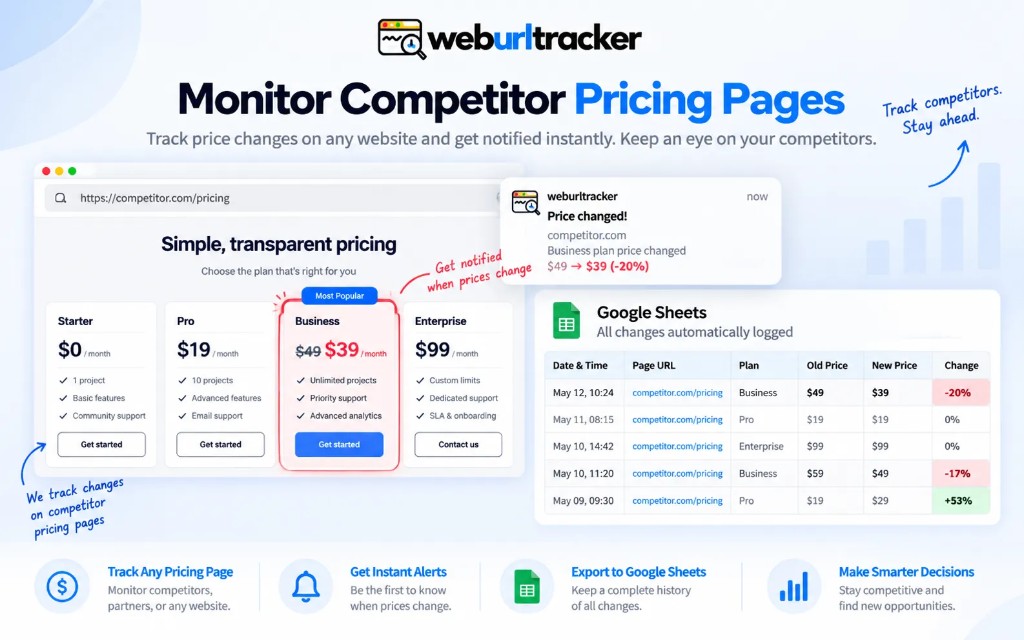
Competitor pricing pages are noisy on purpose. There is a hero, a toggle for monthly versus yearly, a footer of legal asterisks, and a carousel of logos. If you screenshot the whole URL you will hear about every one of those. The watch that works is the cell that would change a deal: the number, the feature row, or the footnote under the number.
Sales and product marketing usually do not need another dashboard. They need a reliable answer to a narrow question: did their Pro tier price change, did they add a seat minimum, did they rename a plan. Competitive intel fails when alerts cry wolf. One ignored alert train means the next real price cut gets missed too.
The setup below is what we see work after teams burn out on full-page watches. It assumes you are using region-level website change monitoring, not a sitemap crawler or an uptime ping.
A setup that survives a week
- One folder per rival, named after the company, not after a person
- Separate monitors for pricing, feature grid, and terms if those update on different cadences
- Region on the plan you actually sell against, not all four columns unless you need all four
- A price rule for drop, increase, or a threshold, so a restyle is not a 'price change'
- Slack or Teams to the people who can respond, with throttle on
Naming folders after people is a common mistake. When the owner changes roles, monitors live in someone else's inbox mentally. Company-named folders survive reorganizations. Inside each folder, use clear monitor names: 'Acme Pro monthly price', 'Acme feature matrix row API access', not 'Monitor 7'.
Split monitors when sections change on different schedules. Pricing numbers move on launch days. Feature checkmarks drift quarterly. Legal footnotes change after counsel reviews. One full-page watch merges all of that into a single noisy timeline. Three tight regions give you three interpretable signals.
Picking the region on a pricing grid
Open the live preview. Click the plan column that matches your pitch deck, not the enterprise column you never compete with. Include the price, the billing period label, and the one feature row buyers always ask about. Exclude the hero, the logo strip, and the chat widget.
Monthly versus yearly toggles are a frequent false positive source. If the toggle animates or reflows the grid, either lock the URL to the expanded state (some sites support query params) or watch the text diff more heavily than the visual diff. A number change should appear in extracted copy even when the animation is ugly.
For visual versus text tradeoffs on these pages, see visual vs text website change detection. Pricing is one of the cases where you want both: the screenshot for the deck, the text diff for the exact old and new strings.
Price rules and thresholds
A price rule fires when a number crosses a boundary you define: dropped below $49, increased by more than 10%, and similar. That filters restyles where the font changed but the integer did not. Visual threshold filters layout noise: cookie bars, banner swaps, carousel frames.
Start conservative. A threshold that is too sensitive teaches the team to ignore Slack. Tune after the first false positive instead of preemptively setting sensitivity to zero. Zero sensitivity means you miss real moves.
Throttle matters on rivals who A/B test heavily. Digest mode or hourly caps keep the channel usable. The goal is signal on real pricing moves, not a play-by-play of every experiment slot.
Visualping, PageCrawl, and this job
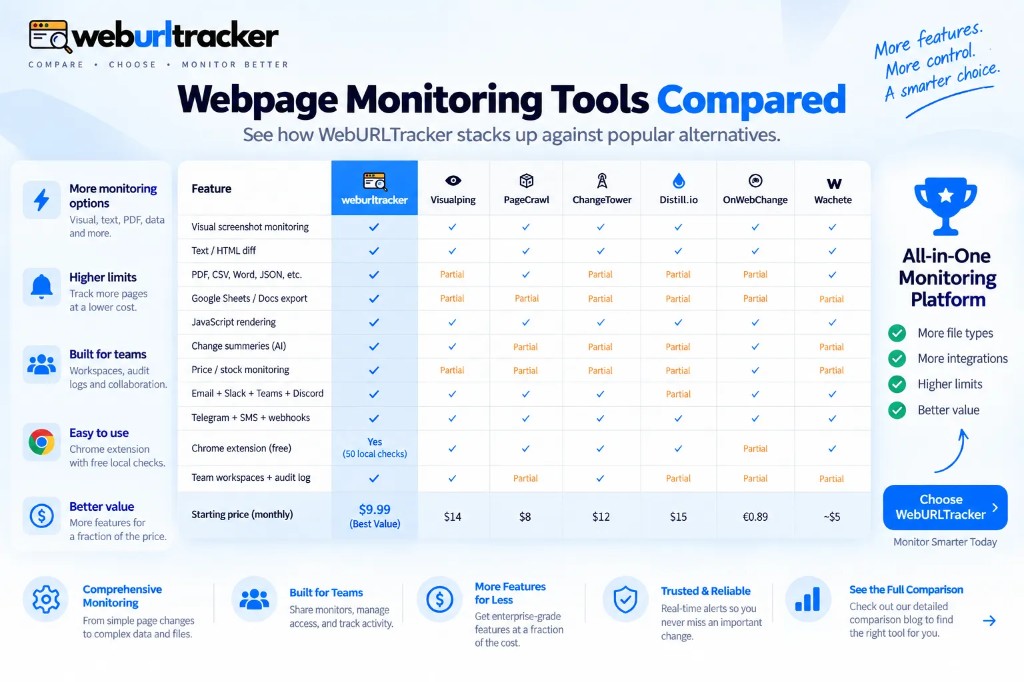
Visualping will give you a picture of the pricing URL. That is useful once. It is less useful when the toggle animation counts as a change. PageCrawl is often cheaper and will crawl sitemaps; that helps if you need many URLs and an AI summary. WebURLTracker is the better solution when the unit of intel is one rectangle, the evidence has to include the old number as text, and merchandising plus sales share the same folder.
If Visualping alert fatigue is what brought you here, Visualping alternative walks through region picking and workspace limits. If you were using Distill locally on one machine, Distill.io alternative covers moving monitors into a shared workspace without losing Local Chrome for gated pricing.
Crawlers shine when you need fifty URLs across a site map and a summary of what moved. They are weaker when you need pixel-proof of one plan cell for a quarterly business review. Match the tool to the unit of decision.
Cadence and when to speed up
Most public pricing pages do not need a two-minute loop. Hourly or a few times a day is enough unless you are in an active price war. Save the fast interval for the week you know a launch is landing. Jitter is built in so checks are not stamped on the clock face.
Before a known competitor event (conference pricing, fiscal year end, funding announcement), temporarily tighten interval on that folder only. Restore the slower cadence after the window passes. Permanent two-minute loops on static pages mostly generate noise and burn check quota.
WebURLTracker Ultimate supports two-minute cloud intervals when you truly need them. Free and entry paid tiers are better spent on more monitors at a sane cadence than on one hyperactive URL.
Signed-in and partner-only pricing
If the grid only renders after login, use Local Chrome. Do not paste session cookies into a cloud worker. WebURLTracker will not ask you to. The extension runs the check in your browser, stores the screenshot and text diff in the workspace, and keeps auth where it belongs: on your machine.
Partner portals and reseller PDFs are out of scope for cloud workers entirely. Local checks or manual uploads may be the only safe path. Be explicit in the folder name that those monitors require someone's session so coverage does not silently stop when they leave.
What to do when an alert fires
Open the event, not the live page first. The before and after artifacts are the record. Confirm the text diff shows a number or clause change, not a banner. Assign to sales if it is pricing, product if it is packaging, legal if it is terms. Mark acknowledged so the audit trail stays clean.
Update your battlecard the same day. Competitive monitors fail when alerts stack up unread. One monitor you act on beats ten monitors you mute.
Reporting upward without screenshot spam
Executives rarely want raw alerts. They want a weekly summary: which rivals moved price, which added a feature row, which changed terms. Build that summary from event history in each folder rather than forwarding every Slack ping. The text diff line makes exec slides faster to write because the old and new numbers are already extracted.
When a real move happens, attach the event link, not a cropped screenshot from your desktop. The event preserves timestamp and monitor name. Forwarded images lose context within one email chain.
WebURLTracker free tier includes 5 monitors, about 220 cloud checks, and 50 Local checks. That is enough for one serious rival folder with pricing, features, and terms split out. Paid plans from $9.99/mo expand monitor count and checks when you cover a full competitive set.
Related blogs
- PageCrawl, ChangeTower, and Wachete compared with WebURLTracker
- Best free website change detection tools in 2026

- Chrome extension website change monitoring for signed-in pages