
AI Summary
Best Buy restocks do not follow one universal schedule. Availability can vary by product, region, SKU, store, and demand, so refreshing a product page is an unreliable way to catch a restock. Add the exact product URL to WebURLTracker, focus on the availability area, choose a checking frequency, and receive a notification when the stock status changes. Useful for PS5s, Xbox consoles, GPUs, laptops, phones, and limited releases.
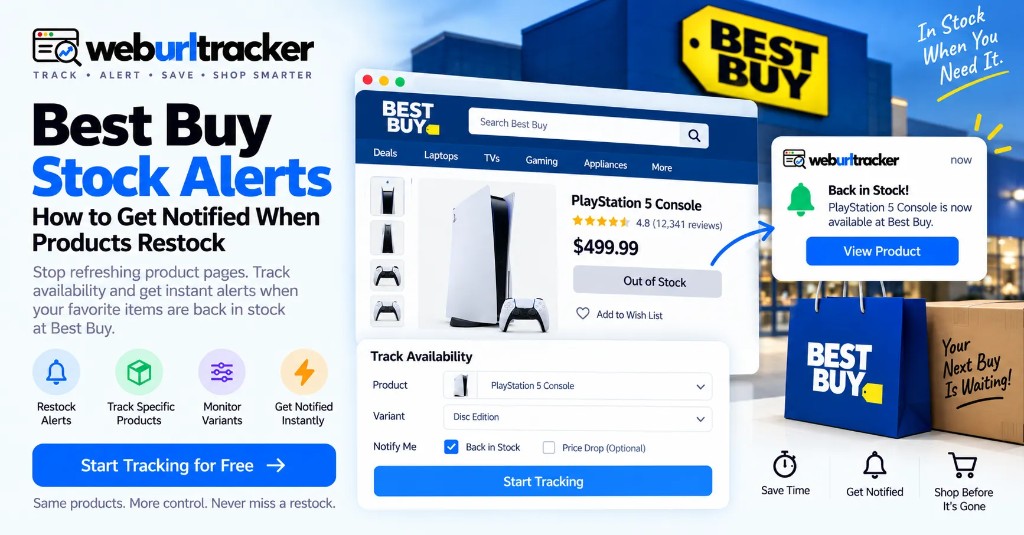
Best Buy restocks do not follow one clock
This guide sits under retail price monitoring. Pair it with Best Buy price tracking when the buy depends on both stock and price. For Amazon restocks, see Amazon in-stock alerts.
Best Buy restocks do not follow one universal schedule. Availability can vary by product, region, SKU, store, and demand, so repeatedly refreshing a product page is an unreliable way to catch a restock.
A better approach is to monitor the Best Buy product page itself. Add the exact product URL to WebURLTracker, focus on the availability area, choose a checking frequency, and receive a notification when the stock status changes.
Useful signals include Add to Cart, Get it today, Sold Out, and Check stores. Use more frequent checks for high-demand products, and separate monitors for different SKUs or local availability. For shoppers tracking PS5s, Xbox consoles, GPUs, laptops, phones, or limited releases, a focused stock monitor can replace constant manual refreshing.
Does Best Buy have a built-in restock alert?
Best Buy may provide notifications for some products or situations, but native restock notifications are often limited and inconsistent across products.
A webpage monitor provides another route. Instead of depending on a retailer-specific notification, you monitor the public product page and watch the availability element that changes when inventory returns. That keeps the signal tied to the listing you would actually buy.
What should you monitor on a Best Buy product page?
You do not necessarily need to monitor the entire page. For stock alerts, focus on the area that communicates availability.
- Add to Cart: product may be purchasable online
- Get it today: availability or delivery option changed
- Sold Out: product is currently unavailable
- Coming Soon: product is not yet available
- Check stores: local inventory information
- Pickup availability: store-level stock may have changed
- Delivery availability: shipping inventory may have changed
Select the Buy Box, Add to Cart area, or availability line near the price. A smaller monitoring area also reduces alerts caused by unrelated page changes such as reviews and recommendation carousels.
Find the exact product and SKU
Open the Best Buy product page for the item you want. If the product has different configurations, choose the exact version first. A console bundle, laptop configuration, GPU model, or storage option may have a different stock status.
One of the easiest ways to miss a restock is to watch the wrong listing. Confirm the model, storage, color, and bundle before you create the monitor.
Copy the product URL
Copy the full product URL and paste it into the preview on this page. Create one WebURLTracker monitor per product or configuration that matters.
Name monitors after the product and the signal. Examples: PS5 Add to Cart, RTX 4070 stock, MacBook pickup. Keep names short so a restock queue stays scannable.
Focus on the stock area
Select the availability section that changes between unavailable and available. Useful areas include Add to Cart, Get it today, Sold Out, Coming Soon, Check stores, pickup availability, and delivery availability.
The more focused the monitored area, the easier it is to distinguish a real stock event from an unrelated page update. If banners and financing copy keep changing, shrink the region until only the purchase or availability line remains.
Choose your monitoring frequency
Frequency should match how quickly the product may disappear.
- PS5, Xbox, GPU, limited release: more frequent checks during active drops
- Popular laptop or phone: raise frequency during a restock window
- General electronics: hourly
- Long-term wishlist: hourly or daily
- Expected sale event: increase frequency before the event
Cloud checks run on a schedule with jitter. Use the fastest practical interval available to you when a short stock window matters. Alerts go to email on the free plan, or Slack, Teams, Discord, Telegram, and webhooks on paid plans.
During quiet weeks, slower checks are enough to catch an unexpected return. During a known drop window, raise frequency on the few SKUs that still matter and leave the rest alone so the alert queue stays usable.
Why you should not guess the Best Buy restock time
People often search for a specific Best Buy restock time. There is no universal guaranteed time. Restock timing can vary by SKU and region because shipments, demand spikes, and vendor releases affect availability.
Instead of building your strategy around a rumored drop time, monitor the page. This is especially important for products that may return to stock unexpectedly. Watch the availability change, not the clock.
Online stock vs local Best Buy store stock
Best Buy availability is not always the same everywhere. An item may be available online but unavailable at a nearby store. Local pickup can also vary by ZIP code.
- Online shipping: Add to Cart and delivery status
- Store pickup: Check stores or pickup module
- Specific ZIP: local availability result
- Different SKU: separate product page or configuration
- Bundle: exact bundle listing
If local pickup matters, monitor the store availability section rather than assuming the general product status tells the whole story. Create separate monitors for different SKUs and local availability where relevant.
Track Best Buy price and stock together
A restock at the wrong price is not always a win. Use one monitor for availability and another for the price area. Separating the signals helps you distinguish a restock from a markdown.
For year-round Best Buy pricing detail, use Best Buy price tracking. During Black Friday week, also see Best Buy Black Friday deal alerts.
Act quickly when the alert lands
High-demand inventory can disappear in minutes. When WebURLTracker notifies you, open the product page immediately, confirm the SKU, check price and pickup or delivery options, and complete the purchase if the offer still works.
Review the stored before-and-after first if you want to confirm what changed. Live pages change again. The event record does not. Still verify the live cart before you rely on any screenshot.
Why a restock alert can arrive too late
Short stock windows, broad monitoring selections, and page delays can cause missed buys. Tighter monitoring areas and more frequent checks can reduce some of this risk, but no alert system can guarantee a purchase before inventory sells out.
Backup monitors on alternate SKUs or retailers help when the first choice sells out again. For Amazon alternatives, keep Amazon in-stock alerts on the same model when both retailers matter.
Location and ZIP differences
Best Buy availability can vary by region and store. Online inventory, shipping availability, and local pickup are not always identical. SKU and ZIP-level differences are common.
If you are tracking store pickup, monitor the availability module for the relevant location rather than relying only on the general product status. Use Local Chrome when a listing needs your signed-in session or a store preference that only appears when you are logged in.
A simple Best Buy restock monitoring workflow
- Find the exact Best Buy product
- Select the desired SKU or configuration
- Copy the product URL
- Add it to WebURLTracker
- Monitor the Add to Cart or availability area
- Choose a frequency based on demand
- Monitor local pickup separately when needed
- Add a price monitor if price matters
- Track alternate SKUs when useful
- Verify stock, price, delivery, and pickup immediately after an alert
Best Buy stock alerts at a glance
- Best starting point: exact Best Buy product URL
- Main signals: Add to Cart, Sold Out, Get it today, Check stores, pickup
- High-demand products: more frequent checks during active drops
- Local vs online: separate monitors when pickup matters
- Noise reduction: focus on the availability area only
- Pair with: price monitor for the same SKU
- Verification: model, configuration, price, delivery, pickup
How WebURLTracker fits this watch
Paste each Best Buy product URL into the preview. Draw only the region that should wake you. Name monitors after the product and the stock signal. Review from the stored before-and-after when an alert lands, then move to the live cart quickly.
Stop refreshing Best Buy. Start monitoring.
You do not need to spend your day refreshing a sold-out product page. Set up your watchlist once. Monitor the exact availability signal that matters. Get notified when the page changes.
Whether you are waiting for a PS5, GPU, laptop, console, phone, or another hard-to-find product, WebURLTracker can turn repetitive stock checking into an automated monitoring workflow. Stop refreshing. Start tracking. Know when the product comes back.
Related guides
- Retail price monitoring hub
- Best Buy price tracking
- Best Buy Black Friday deal alerts
- Amazon in-stock alerts
- Amazon price tracking
Frequently asked questions
Monitor the exact Best Buy product page in WebURLTracker. Focus on the stock area, such as Add to Cart, Get it today, or availability text, and set a suitable checking frequency.
When the preview looks right, create the monitor or browse more retail price guides.